
They say what goes up must come down…but the internet demand in most households seems to have missed that memo. Internet speed, usage, and the amount of devices in your home that rely on it are only on the rise.
An internet speed package that worked well a few years ago may not work as well today — not necessarily because anything is wrong, but because your home may simply be using the internet a lot differently than it used to.
If that sounds familiar, the next step is making sure your current speed is where it needs to be, and then learning about a few signs that it may be time to move up to a faster tier.
First, make sure your current internet speed is measuring where it should be
Before jumping straight to a speed upgrade, let’s first make sure your current package is actually doing what it should be doing.
A good place to start is by running a speed test from your main router in the My Valley Wi-Fi app. That gives a better picture of the true speed coming into your home than testing from a phone, tablet, or laptop somewhere across the house.
The resulting speeds should be somewhere close to the internet package that you have. If that test comes back lower than expected, give us a call. Our customer service reps are great at checking things on the backend and identifying underlying causes.
If everything checks out, and you’re still experiencing slowdowns — especially if the signs below sound a little too familiar — then it may be time to think about moving up to a faster package.
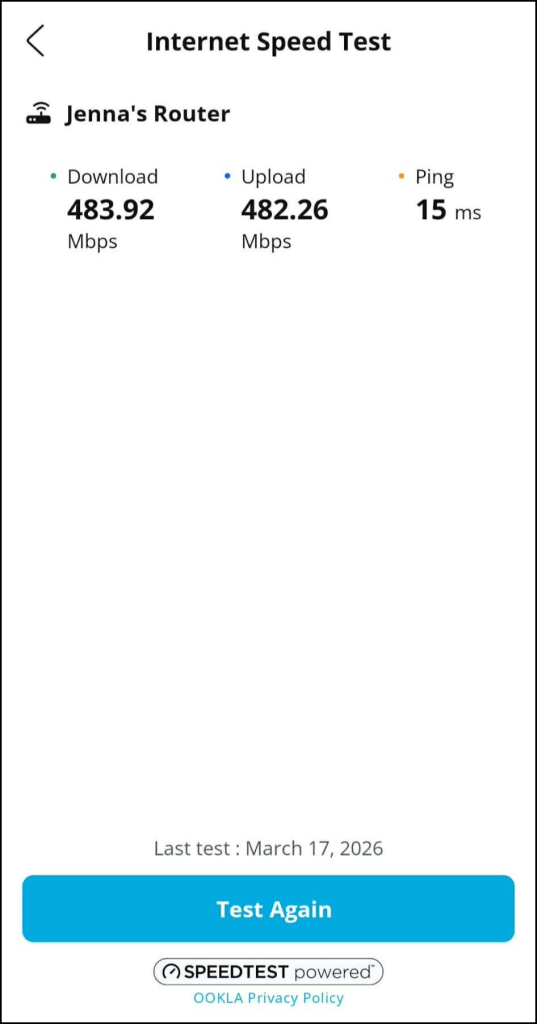
Internet speed test on the My Valley Wi-Fi app. These numbers are measuring well for the user’s internet speed plan.
Sign #1: You may be on a legacy internet speed tier that no longer fits your household
One of the biggest things we see is customers who signed up for a speed package that made perfect sense at the time, but over the years, their household changed.
A plan that once handled simple internet use may now be supporting much heavier internet activity that requires more bandwidth. If you’re still on one of our older legacy speed tiers, your internet package may simply no longer match the way your household uses the internet today.
For customers currently on a legacy 50 Mbps or 100 Mbps plan, this may be a good time to take a look at what other options are available. In many cases, customers in those plans may also qualify for Valley FiberCom’s 3-year promo on speeds of 250 Mbps and above, making it easier to move to a package that better fits today’s internet habits.
Sign #2: Your home has more connected devices, and those devices are using more bandwidth
Even if your daily routine feels mostly the same, your household likely has more devices that use the internet than even a few years ago. And it’s not just the increase in the number of devices — it’s also what those devices are doing that can take up a lot more of your speed.
Many homes now have more devices connected to Wi-Fi than they realize, including:
- Entertainment devices: Smart TVs, streaming devices, gaming consoles
- Personal devices: Phones, tablets, laptops, printers
- School and work devices: School-issued devices, work laptops, desktop computers
- Home security devices: Security cameras, video doorbells
- Smart home controls: Smart speakers, smart thermostats, smart plugs, smart lighting
- Smart home appliances: Smart fridges, stoves, crock pots, microwaves, washers, dryers, robot vacuums
As you can tell, entirely smart homes are quickly becoming the norm. Our customers are often surprised at the number of devices currently connected to their network.
Some of those devices are being actively used and take up more data and bandwidth in what they’re doing. (i.e. Streaming requires much more of your internet capacity than checking email.) Others run quietly in the background. Either way, they are still sharing your connection. And when that list keeps slowly growing over time, your internet package may start feeling more stretched than it used to.
Sign #3: Working from home or online learning can change your internet needs
Did you land a new hybrid or remote role? Is your high schooler or college student taking online classes this semester? One change that can make a noticeable difference in internet speed is adding a work-from-home, hybrid, or online learning routine.
Video meetings, file uploads, cloud-based programs, school portals, and all-day device use can put much more consistent demand on your internet. That large of an increase in daily usage can reveal that your current package no longer gives you the capacity you need.
One helpful resource for situations like this is the device prioritization feature in our My Valley Wi-Fi App. You can prioritize the devices that need the most speed (like a work laptop or a student’s device) and reduce Wi-Fi demand from devices that aren’t being used.
Sign #4: Buffering and slowdowns are becoming more common
If buffering has become more common on multiple streaming apps, streaming is less reliable, or things seem to bog down when multiple people are online, it may be a sign your household is starting to outgrow its current speed.
That does not always mean the answer is automatically upgrading, but it does mean it is worth taking a closer look. Doing a speed test during this peak usage time or while you are experiencing the buffering will give you a clearer picture if your speed is reflecting that buffering.
Sometimes it’s not your internet speed tier at all
It’s also important to remember that not every slowdown means you need faster internet.
For example, if an unauthorized streaming device has recently been added to your home, that may be the real cause of the issue. In those situations, it’s worth unplugging the device and seeing whether your speeds return to normal. If they do, the problem may not be your internet package at all.
That’s why diagnosis matters. In some cases, what looks like “slow internet” is actually a device or setup issue causing the problem instead. (You can read our blog about the FBI’s warning on unauthorized streaming devices here.)
We can help you figure out the next step
If any of these warning signs feel all too familiar to you, run a speed test from your main router in the My Valley Wi-Fi App, then give us a call. We’ll check your connection on our end and help you pinpoint the cause — no pressure to upgrade unless it truly makes sense. And if you do need more speed, we can help you compare tiers and see if you qualify for our 3-year promo on 250 Mbps+.