
You clicked the link. You sent the payment. You gave someone personal information you probably shouldn’t have. You frantically Google, “what to do if you’ve been scammed”. And here you are.
During October, Cybersecurity Awareness Month, we talk a lot about recognizing and avoiding scams. But what happens when you actually fall for one?
The reality is, scams don’t always look like scams anymore. Remember when misspelled words, awkward grammar, and suspicious-looking emails were the biggest giveaways? Thanks in part to artificial intelligence (AI), scammers can now create convincing messages, realistic images, and websites that look nearly identical to the real thing.
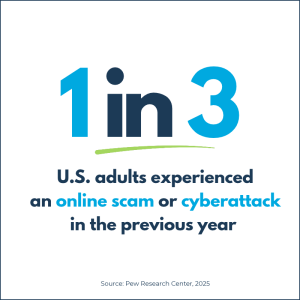
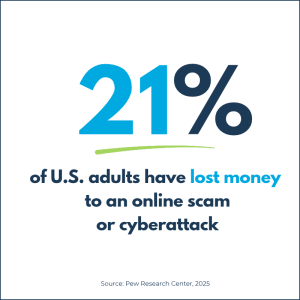
And falling victim to a scam or cyberattack is more common than you might think.
Even the most cautious and tech-savvy people can be deceived. That’s why, at Valley FiberCom, we believe it’s just as important to know what to do after a scam as it is to know how to avoid one.
Knowing what to do if you’ve been scammed can help you act quickly and limit the damage. Here’s where to start.
1. If You Clicked a Suspicious Link
First, don’t panic. Clicking a link doesn’t automatically mean someone has stolen or has access to your information.
Here’s what to do:
- Close the suspicious website and don’t enter any information.
- If a file downloaded, don’t open it. Delete it if you can do so safely.
- Update your device’s security software and run a malware scan.
- If you installed unfamiliar software or gave someone remote access, disconnect your device from the internet and get help removing the software.
If you entered a password or payment information on the website, follow the additional steps below.
2. If You Gave Away a Password
Whether it was through a fake login page, suspicious email, or fraudulent phone call, a stolen password can give scammers access to more than one account.
Here’s what to do:
- Change the affected password immediately using the legitimate website or app, preferably from a trusted device.
- If you reused that password on other accounts, change those passwords, too.
- Enable multifactor authentication (MFA) wherever available.
- Check your account for unfamiliar login activity, sent emails to your contacts that you didn’t send, devices, forwarding rules, or changed recovery information.
- Sign out of other active sessions if the service offers that option.
Tip: Start with your email account if it’s affected. Access to your email can allow scammers to reset passwords for other accounts.
3. If You Sent Money to a Scammer
Maybe you paid a fake invoice, sent a deposit for a rental property, or transferred money to someone pretending to be a business you trust.
Time matters here.
Contact your bank, credit union, credit card company, or payment service immediately. Explain that you believe the transaction was fraudulent and ask whether the payment can be stopped, recalled, disputed, or reversed.
If you used a payment app such as Venmo, PayPal, or Cash App, report the transaction through the app as well.
Keep copies of the transaction, messages, invoices, and payment instructions. You may need them when filing a report.
Unfortunately, getting money back isn’t guaranteed, especially with wire transfers or cryptocurrency. But the sooner you report it, the better your chances of limiting further losses.
4. If You Shared Personal Information
If a scammer obtained your Social Security number, banking details, or other sensitive information, there are steps you can take to protect your identity.
Here’s what to do:
- Visit
IdentityTheft.gov for a personalized recovery plan. - Contact your bank immediately if your financial account information was exposed.
- Consider placing a free credit freeze with Equifax, Experian, and TransUnion.
- Monitor your financial accounts and credit reports for suspicious activity.
A credit freeze can make it harder for someone to open new credit accounts in your name. It doesn’t affect your credit score, and you can temporarily lift it when needed.
5. Report the Scam, Even If You Didn’t Lose Money
Reporting scams helps authorities recognize patterns, investigate fraudulent activity, and warn others.
Here are three trusted places to report what happened:
- Federal Trade Commission:
ReportFraud.ftc.gov — Report scams and fraudulent business practices. - FBI Internet Crime Complaint Center:
IC3.gov — Report internet-related crimes, including online financial fraud. - IdentityTheft.gov:
IdentityTheft.gov — Report identity theft and receive a recovery plan.
If someone is impersonating a company you do business with, contact that company directly, too. Your report may help them recognize an ongoing scam campaign and warn other customers.
One more thing: Be cautious of anyone who contacts you afterward promising to recover your lost money for an upfront fee. Recovery scams are real, too.
“What To Do If You’ve Been Scammed” = Solved
It’s easy to look back and think about what you should have noticed or done differently. But scammers deliberately create situations that feel convincing, urgent, or trustworthy.
The important thing is what happens next.
Act quickly. Secure your accounts. Contact the appropriate organizations. And report what happened.
At Valley FiberCom, we’re committed to helping our communities stay informed and safe online. That includes knowing how to recognize threats, but also knowing how to respond when something goes wrong.
This Cybersecurity Awareness Month, consider bookmarking this guide or sharing it with someone who might need it someday.
Because when it comes to online safety, knowing what to do if you’ve been scammed is just as important as knowing how to avoid scams in the first place.