
By the end of September, the new-school-year excitement has usually worn off, and the rhythm and routine of school nights have started to take shape.
Homework happens at the kitchen table. One kid needs a Chromebook. Another wants to stream a show. Someone is gaming upstairs. Phones are buzzing. Bedtime is getting later than planned, and somehow the Wi-Fi is involved in all of it.
The good news? Your home Wi-Fi can do more than just keep everyone connected. With the Wi-Fi controls available in the My Valley Wi-Fi App, it can actually help support the routines your family is already trying to build.
We know your plate is already filling up (if not full), and we’re not looking to add more to it, but there are definitely smart tools within our app that can help those crazy school nights go a bit smoother.
Put screen-time routines on a schedule
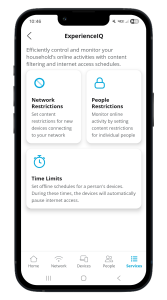
Gone are the days of turning off the router just to get everyone offline at night. With the Profiles and Time Limits tools in our app, you can group devices by person/profile and create different offline schedules for each member of your household.
A younger child might have an earlier internet cutoff, while a teenager may need to stay connected later for homework. Parents can keep their own devices online, and you can even create different schedules for weekdays versus weekends.
During a scheduled offline time, the devices assigned to that person will automatically have their internet access paused. Once the schedule is set, it’s one less thing you have to remember (or repeat) every night.
Bonus: You can customize schedules even further. Not every device assigned to one person has to follow the same schedule. For example, you might keep your teenager’s laptop connected for homework while pausing internet access to their phone to cut down on distractions.
Cut down on distractions during homework
Sometimes the hardest part of homework isn’t the homework. It’s everything competing for attention around it.
Content controls in the app can help families manage access to certain types of online content and create a more focused environment during homework or bedtime. These controls aren’t only for content you don’t want your kids accessing. They can also help limit the digital distractions that tend to pull their attention away from homework.
Think of it less like “taking the internet away” and more like clearing some of the digital clutter when it’s time to focus.
Content controls allow you to filter or block broad categories of content, as well as specific websites and apps. (You can also choose to receive an alert on your phone if someone attempts to access content you’ve blocked.)
Make room for offline time, too
A good Wi-Fi routine doesn’t always mean being more connected.
Maybe your family wants devices put away during dinner. Maybe you’re trying to make bedtime less of a negotiation. Maybe you just want an hour in the evening where everyone is doing something other than staring at a screen.
The app and all of its customizable Wi-Fi controls that allow you to be in the driver’s seat of your network can help reinforce the boundaries your family has already decided on, without requiring you to manually manage every device and person every night.
Let your Wi-Fi controls work with your routine
Every household looks a little different, and there’s no perfect school-night schedule that works for everyone. The My Valley Wi-Fi App gives families tools to shape their home network around the rules and routines that work best for them.
Because sometimes the best technology isn’t the newest, latest, most robust thing. It’s the technology that quietly makes one part of your day easier.
Want to see how the My Valley Wi-Fi App can make school nights a little easier? Learn more about the available tools and download the app here.